


Why Custom Design Shopify Solutions Are Essential for Your Brand’s Success
Custom design shopify stores outperform generic templates, with research from Forrester showing a well-designed user interface can boost conversion rates by up to 400%. Fast load times are also critical, as each second of delay can cause a 7% drop in conversions.
Quick Answer: Custom Design Shopify Options
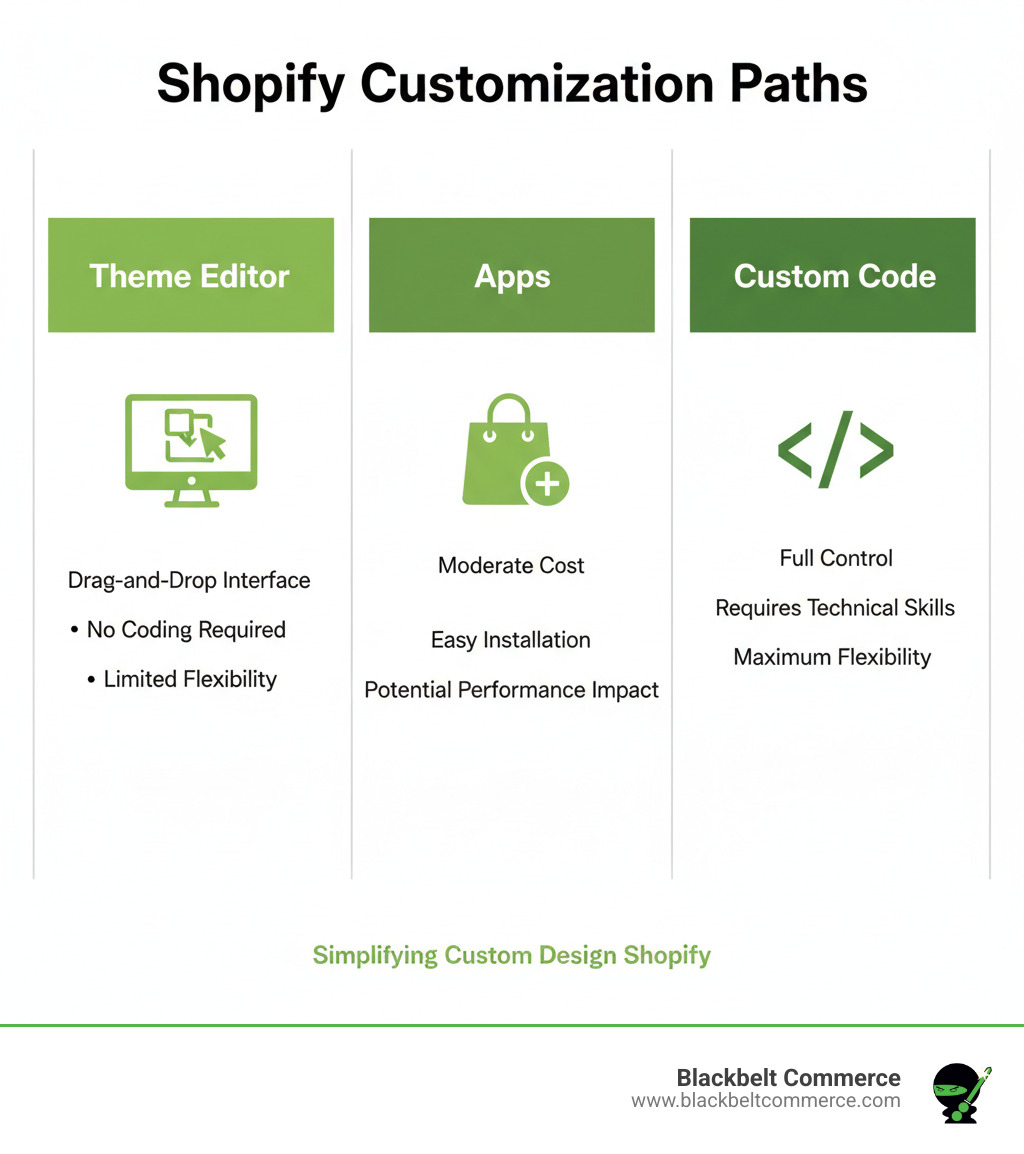
- Theme Editor – No-code customization using Shopify’s built-in tools
- Shopify Apps – Add functionality through page builders and specialized tools
- Custom Code – Full control through HTML, CSS, Liquid, and JavaScript editing
- Professional Development – Hire experts for complex customizations and unique features
Your Shopify store is your digital flagship. While standard themes are functional, they often feel generic and fail to capture your brand’s unique identity. The right customization approach depends on your technical skills, budget, and business goals.
This guide covers every level of Shopify theme customization, from simple editor changes to advanced custom development. You’ll learn which method to use and how to avoid common pitfalls that harm store performance.
As Cesar A Beltran, founder of Blackbelt Commerce with over 15 years of experience in custom design shopify projects, I’ve helped over 1000 businesses build high-converting stores. This guide shares the strategies we use for our award-winning Shopify Plus clients across North America, Europe, and Australia.
Simple guide to custom design shopify terms:
- create shopify theme from scratch
- custom liquid code for shopify
- how to add custom css to shopify theme
Foundation First: Preparing for a Flawless Theme Customization
Before starting any custom design shopify project, proper preparation is essential to avoid costly mistakes. A solid foundation for your theme customization ensures a smooth and successful process. Let’s walk through the key steps professional developers follow.
Choosing the Right Starting Point
Your theme choice is foundational. The Shopify Theme Store offers hundreds of themes built for speed, reliability, and conversion, including access to Shopify’s world’s best-converting checkout.
Free themes like Dawn are flexible and great starting points. We’ve written about Customizing Dawn Theme Shopify because it’s such a solid base. Premium themes offer advanced features, more built-in sections, and dedicated developer support, providing much more functionality out of the box.
Industry-specific themes can be game-changers, as they often include relevant layouts and features your customers expect. Before committing, review the theme’s existing features like product recommendations or review sections. The more functionality built-in, the less you’ll need to add later. Always read customer reviews for real-world insights on performance and support.
Even the best theme needs customization to reflect your brand. Our expertise in Shopify Web Design helps you create something uniquely yours.
The Golden Rule: Always Create a Backup
The golden rule for developers is to always duplicate your theme before making any changes. This simple step is a safety net that prevents potential disasters. A backup allows you to restore your store in minutes if a change breaks something, making a safe testing environment non-negotiable.
Duplicating your theme is simple: go to Online Store > Themes, find your theme, click Actions, and then Duplicate. You now have a perfect copy to experiment with.
Use smart naming conventions like “Theme Name – Custom [Date]” to easily manage different versions. This will help you quickly find the right one when juggling multiple copies.
Know Your Support System
Understanding who to contact for help saves hours of frustration. Different issues require different experts.
-
Theme documentation is your first stop for questions about built-in features and settings. It’s a user manual for your theme’s options.
-
Theme developer support is available for premium themes and covers theme-specific functionality. They also provide free updates to keep your store secure and compatible.
-
Shopify support handles platform-related questions, general guidance on the theme editor, and basic troubleshooting for your online store.
For complex custom design shopify work or unique feature development, agencies like Blackbelt Commerce bridge the gap between standard tools and your brand’s specific needs.
The Three Paths to Customization: Editor, Apps, and Code
For custom design shopify, there are three main paths. Choosing the right one is key to success, and the best results often come from combining them strategically. Each approach suits different budgets, timelines, and technical comfort levels.
| Factor | Shopify Theme Editor | Shopify Apps | Custom Code (Developer) |
|---|---|---|---|
| Cost | Free (included with Shopify) | Free to hundreds of dollars/month | Varies widely (freelancer, agency) |
| Skill Level | No coding required | No coding required (mostly) | HTML, CSS, Liquid, JavaScript |
| Flexibility | Limited to theme settings | Moderate to high (app-dependent) | Unlimited |
| Maintenance | Low (handled by Shopify) | Moderate (app updates, compatibility) | Moderate to high (developer needed) |
Path 1: The Shopify Theme Editor (Your No-Code Starting Point)
The Shopify theme editor is a no-code tool in your online store dashboard that lets you customize your store’s appearance with simple point-and-click actions. You can drag-and-drop sections to rearrange layouts, change colors and fonts to match your brand, and add announcement bars for promotions in seconds.
The editor’s beauty is its simplicity; it’s nearly impossible to break anything. However, you are limited by the theme developer’s pre-set options. You can rearrange elements and change styles, but you can’t fundamentally alter the structure. For new store owners, these boundaries can be helpful guardrails.
Path 2: Expanding Functionality with Shopify Apps
The Shopify App Store allows non-technical owners to move beyond basic customization. Apps act as specialized tools for your custom design shopify project.
- Page builders like PageFly or GemPages offer advanced drag-and-drop interfaces to create custom landing pages and unique layouts without code.
- Product customizers let customers design or configure products, such as engraving jewelry, leading to higher order values.
- Experience improvers include review apps, wishlist features, and loyalty programs that build trust and encourage repeat purchases.
However, apps have trade-offs. Monthly subscription costs can add up, and each app adds code that can slow down your site. Always learn about app compatibility and monitor your site speed as you add more apps.
Path 3: Opening Full Control with Custom Code
Directly editing your theme’s code offers unlimited possibilities for custom design shopify projects, but it also comes with greater responsibility.
- Small CSS tweaks are a great entry point. You can change a button color to perfectly match your logo or adjust spacing around images for a more polished feel.
- Major layout changes require more expertise but can completely restructure your product pages or checkout flow to better suit your customers.
- Adding unique features is where custom code excels. We’ve built custom solutions like size recommendation engines and B2B pricing calculators that provide a genuine competitive advantage.
This path requires solid knowledge of HTML, CSS, JavaScript, and Shopify’s templating language, Liquid. If you’re not comfortable with these, it’s best to partner with experts. Our team at Blackbelt Commerce specializes in Custom Liquid Code for Shopify, turning complex requirements into clean, fast-loading solutions.
The Pro’s Playbook for Custom Design Shopify
To create a truly exceptional store, you need professional-level custom design shopify development. This transforms your site from a generic template into a unique digital experience that captures your brand. This requires the right tools and a proven workflow.
Essential Tools for a custom design shopify Project
Professional development relies on a specific toolkit to ensure an efficient and safe workflow.
- Shopify CLI: A command-line tool that streamlines development. It lets you pull theme code, run a local server for testing, and push changes directly to the store, bypassing the admin UI.
- GitHub (or other version control): Your safety net and collaboration hub. It tracks every change, saves every version, and allows you to roll back to a working state if something goes wrong. It is essential for complex projects.
- Code Editor: Your creative workspace. VS Code is popular for its understanding of Shopify’s Liquid language, error highlighting, and integration with version control.
- Collaborator Accounts: These special accounts provide developers with secure, permission-based access to your store without using a staff seat. Collaborator accounts let you grant specific permissions, like “manage themes,” without handing over full control.
The Step-by-Step Customization Process
At Blackbelt Commerce, we follow a refined custom design shopify process to ensure every project is smooth, safe, and successful.
- Request Collaborator Access: We start by requesting access with “manage themes” permissions for secure entry to the necessary files.
- Pull the Theme via Shopify CLI: We download the current theme’s code to our local environment, ensuring we work with the exact live version.
- Local Development: Using the
shopify theme devcommand, we create a local server with hot reloading. This allows us to see changes instantly in a browser preview, speeding up development. - Push to a Development Theme: Once changes are complete, we push them to a separate, non-live development theme on the merchant’s store for review.
- Share Preview Link for Approval: We provide the merchant with a preview link. This lets them experience the changes without affecting the live site. We only go live after receiving full approval.
Customizing a Theme vs. Building from Scratch
A major decision in any custom design shopify project is whether to customize an existing theme or build a new one from scratch.
Customizing a theme is often the smartest approach. It’s faster and more cost-effective, as you start with a proven, commerce-ready foundation. You can focus your budget on the unique elements that matter most to your brand.
However, some brands require total brand control that only a custom build can provide. If you have highly specific user flows or need functionality that doesn’t exist in any theme, starting from scratch may be the only option. Learn more in our guide on how to Create Shopify Theme from Scratch.
Both paths can lead to exceptional results. At Blackbelt Commerce, we excel at both, ensuring your store perfectly matches your vision.
Beyond Aesthetics: Ensuring Performance, Accessibility, and SEO
A stunning custom design shopify store is not enough. If it’s slow, hard to use, or invisible to search engines, it won’t convert. Performance, usability, and SEO are just as critical as aesthetics for turning visual appeal into sales.
The Need for Speed: How Customizations Impact Load Time
Performance is paramount: a 1-second delay in page load time can cause a 7% drop in conversions. For a high-revenue store, this can translate into millions in lost sales annually. Most performance issues from customizations are preventable.
- Image Optimization: Uncompressed high-resolution photos kill conversions. Use modern formats like WebP, along with JPEG for photos and PNG for transparency, to reduce file sizes.
- Minifying CSS and JavaScript: This process removes unnecessary characters from code, reducing file size without affecting how it works.
- Avoiding Excessive Apps: Each app adds code that can slow your store. Regularly audit your apps and remove any that don’t provide clear value.
- Lazy Loading: This technique loads images and videos only when they are about to enter the user’s view, improving initial page load time.
- Performance Testing: Regularly use tools like Google PageSpeed Insights or GTmetrix to diagnose and fix performance issues.
Best Practices for a Professional and Functional Store
A professional store offers an effortless experience for every customer, regardless of their device or abilities.
- Mobile-First Design: With most customers shopping on phones, we design for the smallest screen first and scale up, ensuring a seamless mobile experience for every custom design shopify project.
- Responsiveness Testing: Your store must function perfectly on all devices, from iPhones to desktops. We test extensively across different screen sizes.
- Accessibility (WCAG): Ensure your store is usable by everyone. This includes using sufficient color contrast, enabling keyboard navigation, and providing descriptive alt text for images for screen readers.
- Semantic HTML: Using the correct HTML elements helps accessibility tools and search engines understand your content’s structure and meaning.
- Clear Navigation: An intuitive navigation structure is the cornerstone of a good user experience. If customers can’t find what they’re looking for, they’ll leave.
Our Shopify Development Experts prioritize these fundamentals as the foundation of every successful online store.
Navigating Limitations and Future-Proofing Your Theme
Even the best custom design shopify store has limitations to plan for.
- Theme Updates Overwriting Customizations: Theme updates can erase your custom code. Keep detailed records of all modifications and test thoroughly after updating.
- App Compatibility Issues: Conflicts can arise when Shopify or apps are updated. Regular monitoring helps prevent these issues.
- Shopify Checkout Customization Limits: Shopify heavily restricts checkout customization to maintain its high performance and security. This is a benefit, as you’re leveraging the world’s best-converting checkout, which converts 15% higher on average. Focus your customization efforts on product pages and the shopping experience leading up to checkout.
Frequently Asked Questions about Custom Shopify Design
Here are answers to common questions we receive from merchants about custom design shopify projects.
What are the potential costs of theme customization?
Custom design shopify costs vary widely based on the approach:
- DIY: Your main investment is time spent learning and implementing changes. The only monetary cost is your Shopify subscription.
- App Subscriptions: These can range from $10 to over $50 per month for common apps, with some enterprise-level apps costing hundreds.
- Freelance Developers: Experienced Shopify developers in markets like New York City typically charge $50-$150 per hour. A single custom feature could cost between $750 and $3,000.
- Agency Projects: Agencies usually offer fixed-price packages starting at several thousand dollars. This provides a predictable budget and a full team of experts. When you Hire Dedicated Shopify Developer through an agency, you invest in a proven process and accountability.
How can I achieve a unique brand aesthetic, like a retro or minimalist look?
Achieving a unique aesthetic with custom design shopify is about crafting a complete brand experience. Here’s how:
- Mood Boards: Collect images that capture your vision, whether it’s 90s retro or modern minimalism. This will be your design guide.
- Custom Fonts and Color Palettes: A carefully chosen typeface and color scheme can instantly communicate your brand’s personality and evoke specific emotions.
- Unique Section Layouts: Break free from standard templates by creating a Custom Page Template Shopify for a magazine-style layout or an interactive brand story.
- CSS for Styling: CSS is your secret weapon for achieving specific looks, from pixelated retro graphics to the clean lines and perfect spacing of a minimalist design.
- High-Quality Brand Photography: Professional, on-brand imagery can make even a basic theme feel unique and premium.
Who should I hire for complex custom design shopify work?
Choosing the right partner for a complex custom design shopify project is critical. Here’s what to look for:
- Portfolio Quality: Look beyond visuals. Are their past projects fast, mobile-friendly, and conversion-focused? A beautiful site that doesn’t sell is a failure.
- Client Reviews: Testimonials reveal the real story. Look for praise about communication, meeting deadlines, and creative problem-solving.
- Shopify Partner Directory: Start your search with the Shopify Partner Directory to find vetted professionals who meet Shopify’s high standards.
- Communication Style: A great developer must be able to explain technical concepts clearly and keep you updated. Ensure they listen to your business goals.
- Freelancer vs. Agency: Freelancers are great for smaller, well-defined tasks. For comprehensive projects, an agency offers a team of specialists (designers, developers, project managers) and reduces risk. Our team of Shopify Experts Shopify Developers at Blackbeltcommerce: Who Are They? brings collective experience from thousands of projects to solve problems effectively.
Conclusion: Your Partner in Creating a Standout Shopify Store
This guide has covered the full spectrum of custom design shopify, from simple editor tweaks to advanced custom code. You now understand the three paths to customization, when to use them, and the tools pros use to build high-converting stores.
The goal of custom design shopify is to create an authentic brand experience that guides customers toward a purchase, boosting conversion rates and building loyalty. You are now equipped to choose the right path for your budget, timeline, and technical comfort.
However, complex projects are too important to leave to chance. For custom design shopify work that drives real business results, partnering with an expert agency like Blackbelt Commerce is the best path forward.
We specialize in creating Custom Shopify Websites that are built from the ground up to convert. With our team in Los Angeles and New York, we’ve helped over 1,000 businesses transform their online stores into revenue-generating machines.
Ready to take your store to the next level? Explore our Shopify Theme Customization services to see what’s possible, or contact us for a consultation to discuss your goals. Let’s build your perfect Shopify store together.
Quick Answer: custom design shopify
A custom design shopify is a tailored ecommerce build designed around a merchant’s operations, customer journey, integrations, and growth goals. It is useful when a standard theme or app stack cannot deliver the experience, workflows, or performance the business needs.
Want a sharper Shopify growth plan?
If this article connects to a current store decision, use the calendar to book a strategy call and turn the idea into a practical plan.
Key Takeaways
- custom design shopify should answer the reader’s immediate question and then connect the advice to a practical Shopify business decision.
- The article should feel specific, useful, and worth sharing rather than like a generic SEO insert.
- Internal links should reinforce the home page, Shopify experts, Shopify Plus agencies, and the most relevant service pages.
- The commercial bridge should connect the topic to the Shopify Custom Development, Design, and Technical Implementation cluster without interrupting the educational flow.
- The same-page Calendly CTA should let qualified readers book a strategy call without leaving the article.
How this connects to your Shopify growth strategy
This article should remain useful for readers researching custom design shopify, but it also needs to show when the topic becomes a business decision. For the Shopify Custom Development, Design, and Technical Implementation cluster, the commercial bridge is practical: once the reader understands the concept, the next step is deciding whether their current Shopify setup can support the desired experience, conversion path, and operational workflow. That is where expert planning, design, development, CRO, and SEO support can turn the idea into measurable store improvements.
Want a sharper Shopify growth plan?
Use this guide as a decision tool. Then book a strategy call when you want a practical roadmap for your store.
Related Shopify resources
These internal resources support the Shopify Custom Development, Design, and Technical Implementation topic cluster and help connect this guide to stronger commercial next steps:
- Shopify Custom Development
- Shopify experts
- Shopify Plus agencies
- Shopify Custom Development — Parent service page for the reader’s next commercial step
- Blackbelt Commerce — Home-page authority link for brand and core Shopify expertise
- Shopify experts — Money-page link requested for expert-hiring intent
- Shopify Plus agencies — Money-page link requested for high-growth and Plus-agency intent
- Shopify CRO — Conversion service page for readers focused on revenue and lead generation
- Shopify checkout optimization — Related conversion article
- Shopify conversion optimization — Related CRO article
Questions store owners ask before taking action
What should a Shopify design package include?
Useful packages often include strategy, UX planning, theme setup or customization, mobile design, content guidance, SEO basics, QA, and conversion-focused improvements.
Why do design packages vary in price?
Scope changes depending on content, custom development, apps, integrations, SEO needs, revisions, QA, and post-launch support.
Is visual design enough for a Shopify store?
No. The store also needs strong navigation, product storytelling, speed, trust signals, analytics, and checkout clarity.
When should merchants hire Shopify experts?
Expert help is useful when the store needs custom layouts, CRO, app cleanup, SEO protection, or a more strategic build process.
How should design content create leads?
It should clarify scope and risks, then invite qualified merchants to book a strategy call before investing in the wrong design path.
Future articles needed for topical dominance
To build deeper topical authority around this cluster, these supporting topics should be created later and linked back into this article:
- Custom Design Shopify Checklist for Shopify Store Owners: Creates a practical support article that turns the Shopify Custom Development, Design, and Technical Implementation topic into an actionable review tool.
- Common Custom Design Shopify Mistakes and How to Avoid Them: Captures problem-aware searches and gives BBC a natural place to explain implementation risks without hard selling.
- When to Hire Shopify Experts for Custom Design Shopify: Connects informational demand to the expert-hiring money page while preserving educational intent.
Want a sharper Shopify growth plan?
Ready to turn the advice in this article into an action plan? Open the calendar here and choose a time that works for you.

